Stop losing orders to heat and cold.

ThermoGuard checks the forecast where each order is going, for every day it is in transit, and acts before the parcel ships.

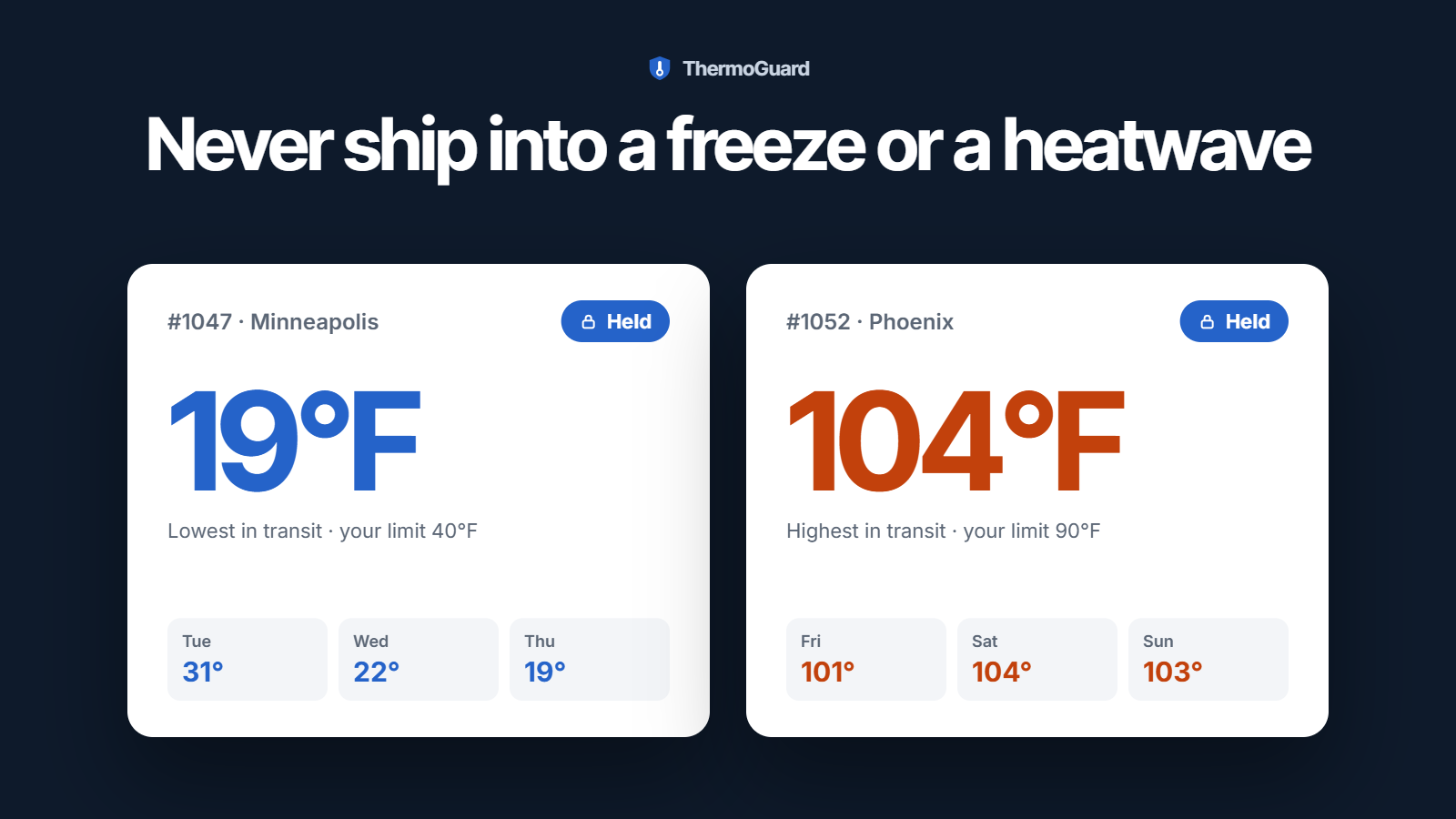
Two held orders: #1047 to Minneapolis, with a low of 19°F in transit against a 40°F limit, and #1052 to Phoenix, with a high of 104°F against a 90°F limit.

A parcel that melts in transit is paid for three times.

Once for the goods, once more for the replacement and the postage, and a third time when the customer does not come back.

  • Checking the weather by hand does not scale

    Looking up the forecast before every order ships works at ten orders a day. Not at two hundred, and not on a Friday afternoon.

  • A disclaimer is not an agreement

    “Not responsible for melted items” in your footer is not the same as a shopper who accepted the risk before paying.

  • Your warehouse ships what it is sent

    A 3PL prints the label whatever the weather at the other end. An order has to be stopped before it reaches them.

  • The cheapest shipping is the riskiest

    In a heatwave the slowest method leaves a parcel in a hot van the longest — and it is the one a shopper picks to save a few dollars.

Two seasons. One set of rules.

Chocolate melts in July, plants freeze in January. Pick the season you lose orders to and see what ThermoGuard does about it.

Which weather costs you orders?
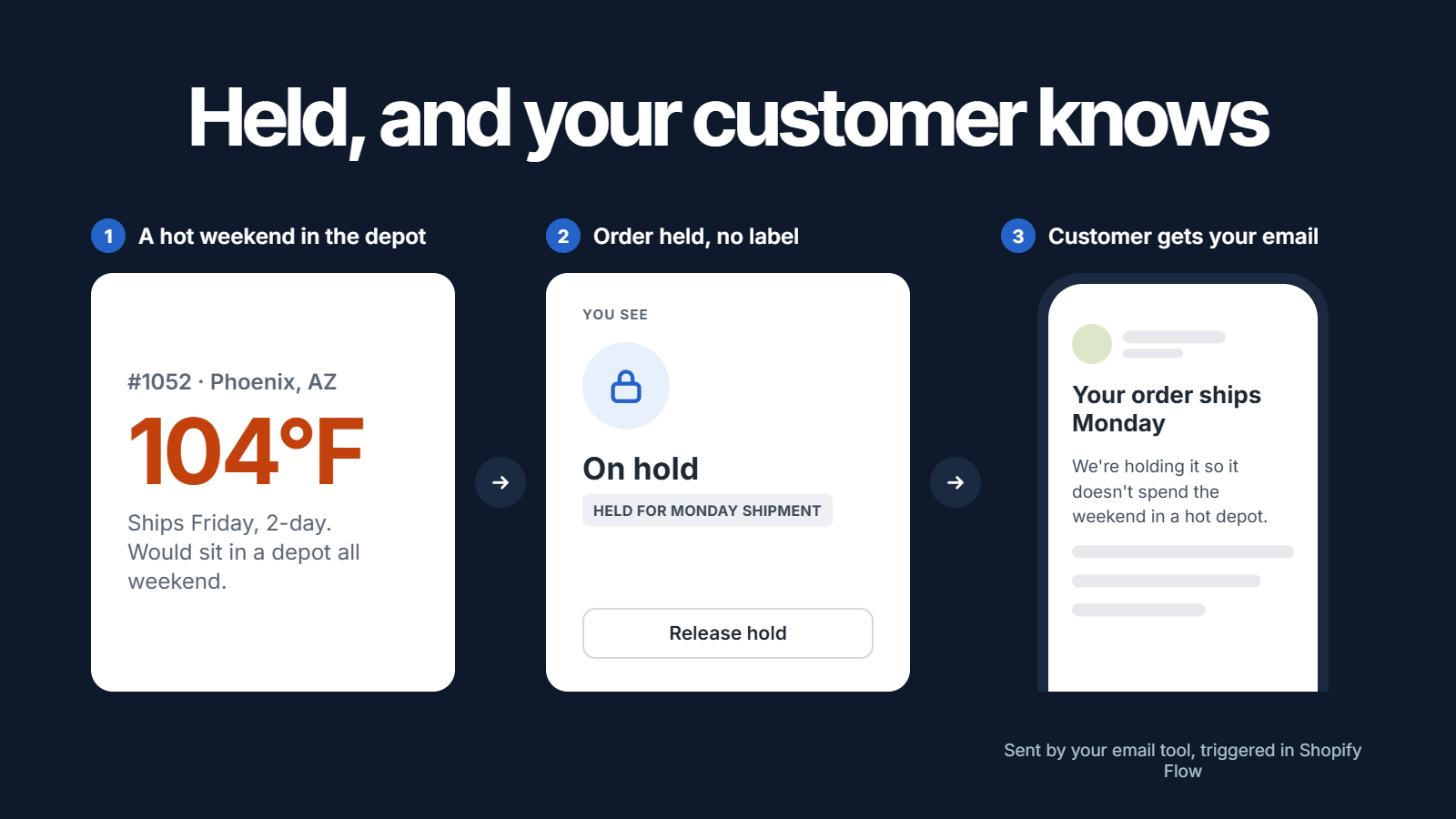
Three steps: order #1052 to Phoenix would sit in a 104°F depot over the weekend, so it is held with no label printed, and the customer gets the store’s own email saying it ships on Monday.
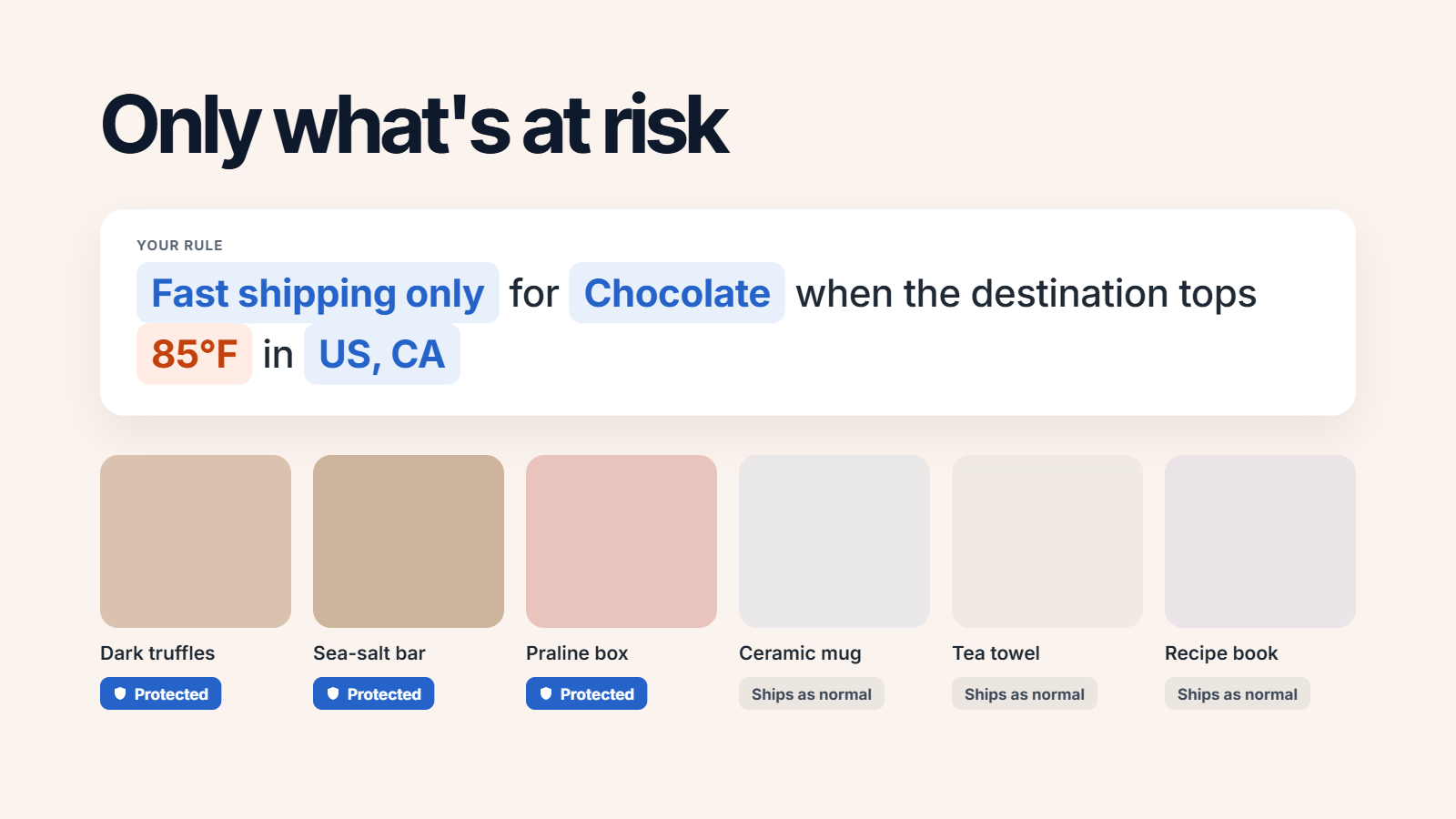
A rule offering only fast shipping for chocolate when the destination tops 85°F. Truffles, a sea-salt bar and a praline box are protected; a mug, a tea towel and a recipe book ship as normal.
Three steps: order #1052 to Phoenix would sit in a 104°F depot over the weekend, so it is held with no label printed, and the customer gets the store’s own email saying it ships on Monday.
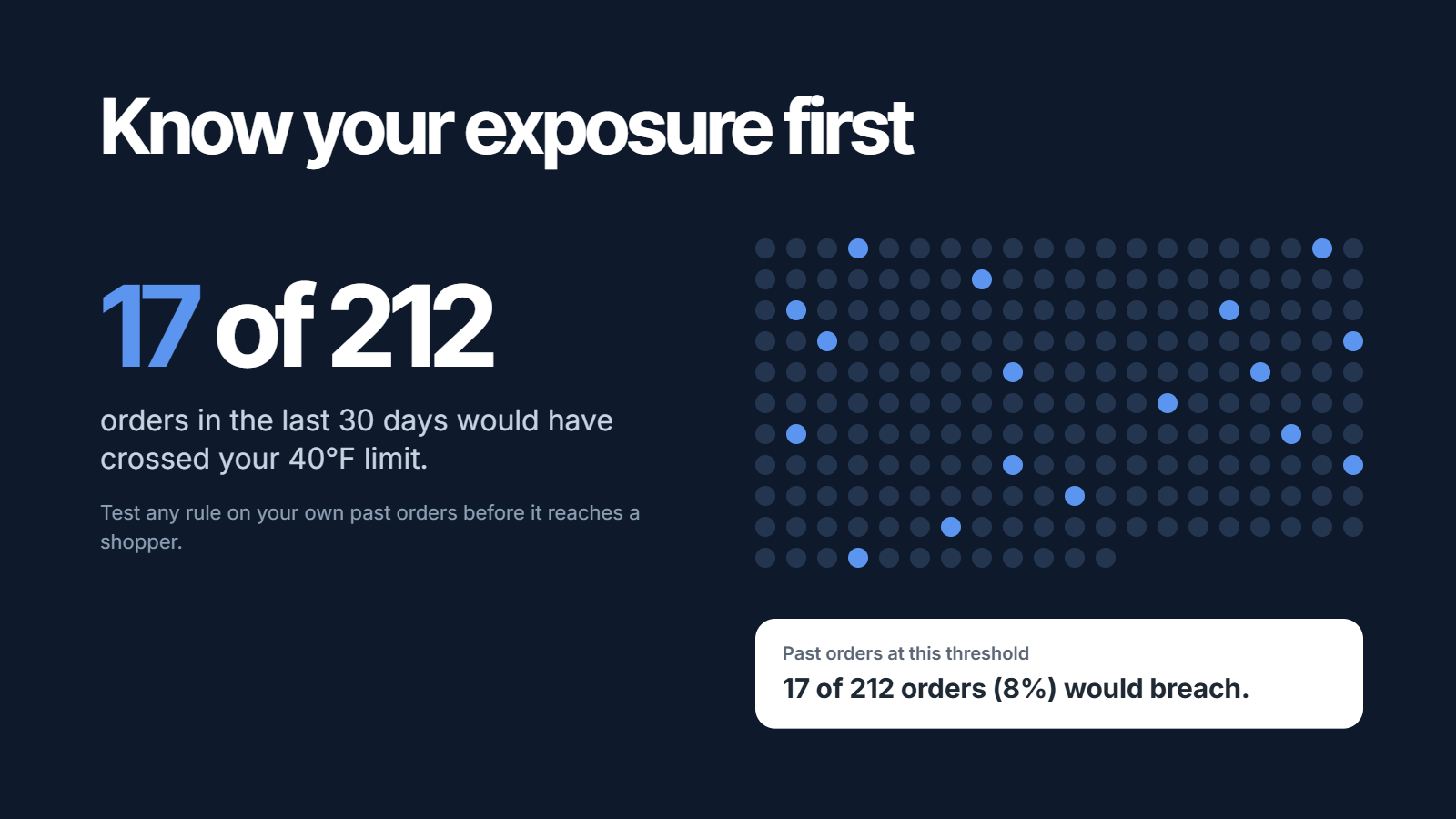
A rule tested on past orders: 17 of 212 orders in the last 30 days would have crossed a 40°F limit.
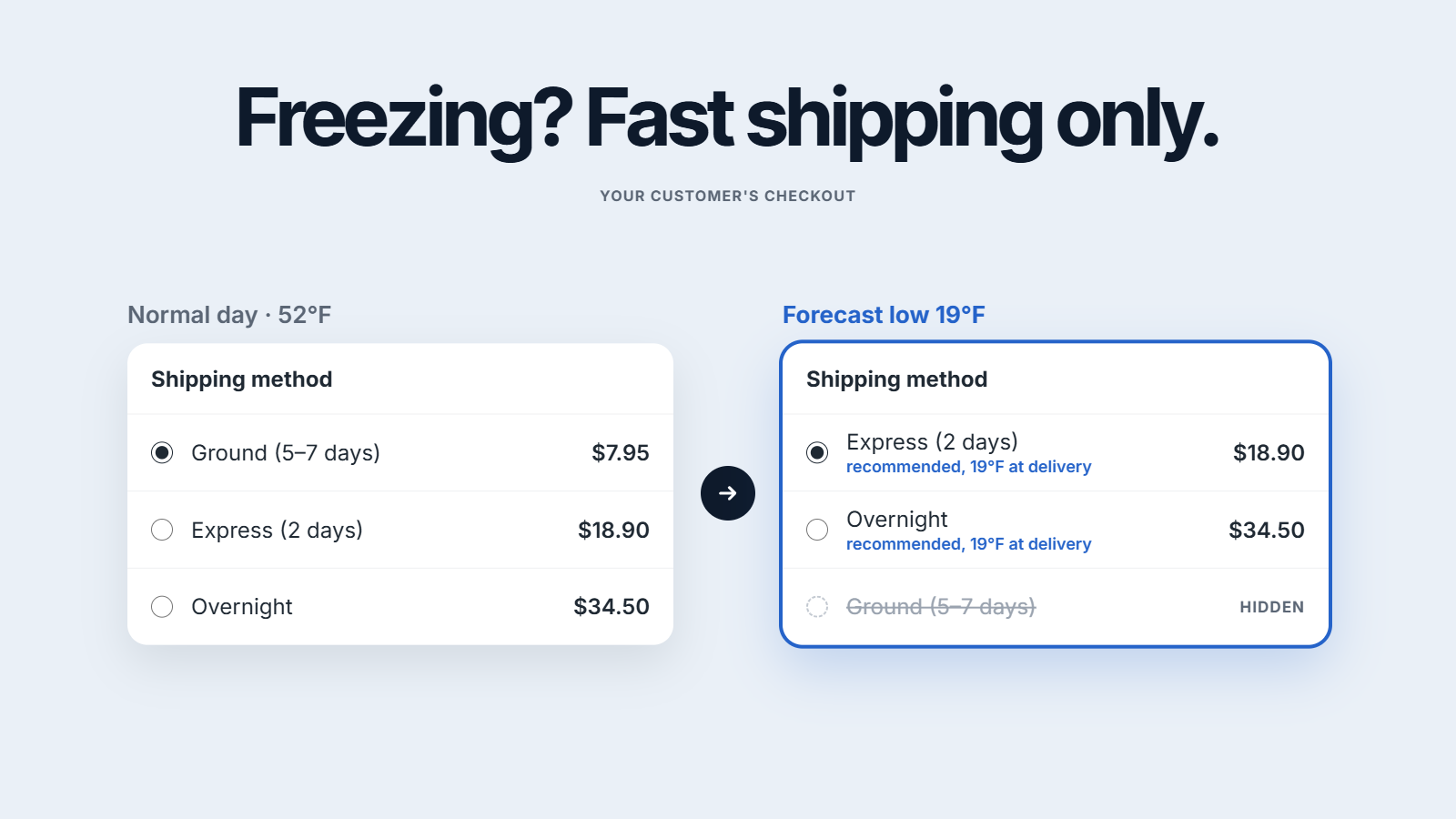
Checkout on a normal day offers ground, express and overnight. With a forecast low of 19°F, ground is hidden and the two fast methods are marked as recommended.
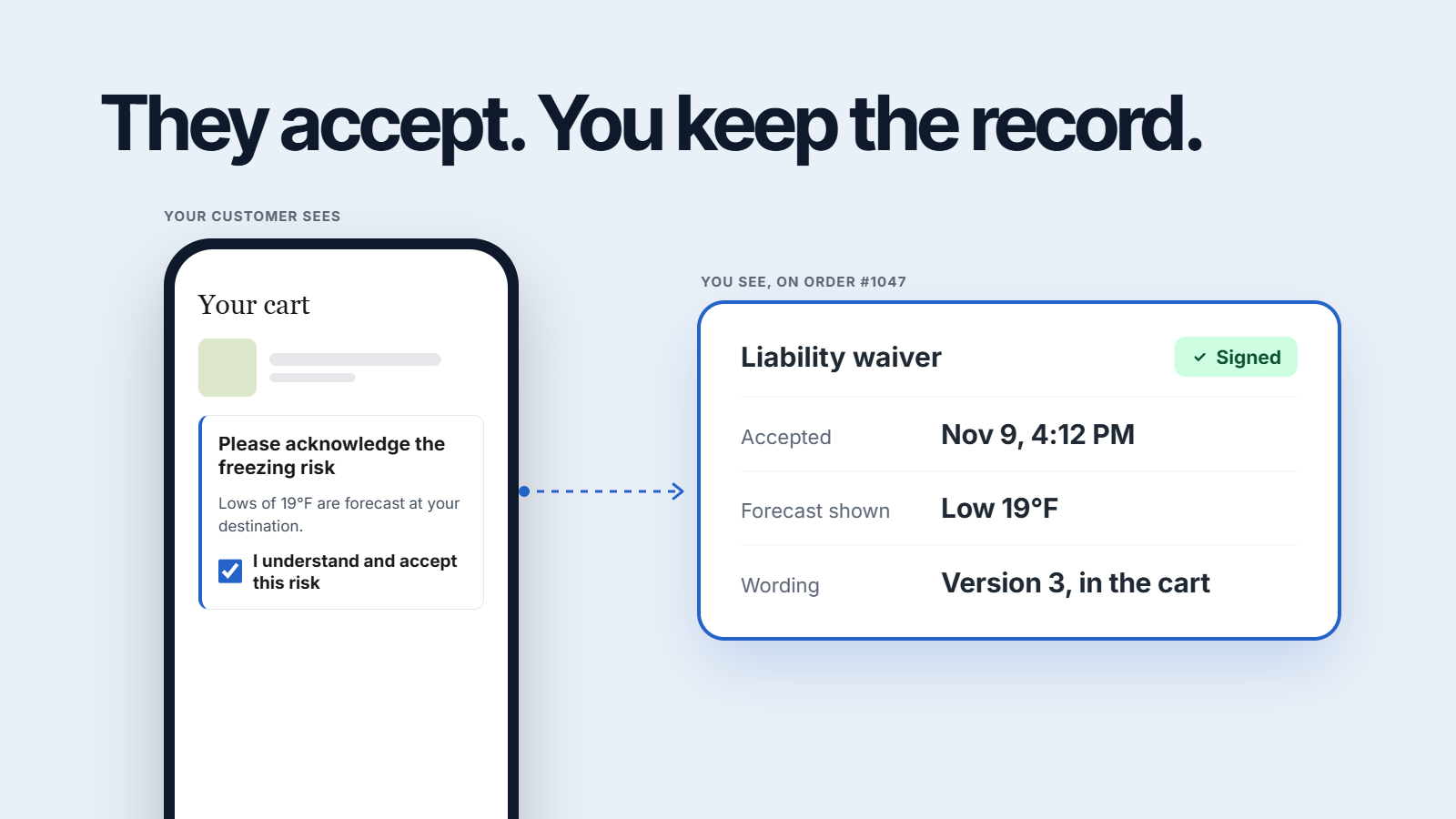
A cart on a phone asks the shopper to accept a freezing risk. Beside it, the order shows the signed acceptance with its time, the forecast shown and the version of the wording.
Two held orders: #1047 to Minneapolis, with a low of 19°F in transit against a 40°F limit, and #1052 to Phoenix, with a high of 104°F against a 90°F limit.

Summer heat

When the forecast on the route crosses your limit, the order goes on hold, so no label is printed. Release it with one click when it is safe to ship.

Point a rule at your chocolate collection, a product tag or a list of countries. Orders without those products ship as normal.

ThermoGuard never emails your shoppers. A held order triggers Shopify Flow, so your own email tool tells the customer, in your voice.

Test a rule on your past orders and see how many it would have flagged, before a single shopper sees it.

Winter frost

When the route drops below your limit, checkout hides the slow methods and marks the fast ones. If every method is slow, nothing is hidden: a shopper can always check out.

The cart asks the shopper to accept the freeze risk before checkout. The time, the forecast they were shown and the wording they accepted are saved on the order.

Orders heading into a freeze wait beside the ones heading into a heatwave, each with the forecast that stopped it and the limit it crossed.

Orders collected in store or rung up at your POS skip the rules entirely: no notice, no acceptance, no hold.

Set up in three steps.

Starter is free. Professional starts with a 14-day trial.

Install free
  1. Choose your units and your wording

    °F or °C, and the text shoppers read when they are asked to accept the risk, in every language your store sells in.

  2. Set your heat and frost limits

    The temperature above or below which a parcel is at risk, and what happens then: a notice, an acceptance, fast shipping only, or a hold.

  3. Switch it on in your theme

    Turn on the ThermoGuard app embed in the theme editor. No code to edit, and the notice’s colours are settings there too.

Free to see the risk. One flat price to act on it.

Starter costs nothing. Professional is one price with unlimited orders and no usage fees, and starts with a 14-day trial.

Billing period

Questions merchants ask before installing

Where the weather comes from, what your shoppers see, and what it costs.

From public government forecasts: the US National Weather Service for US addresses and MET Norway for the rest of the world, refreshed every three hours. ThermoGuard looks at every day the parcel will be in transit, up to seven days ahead; a longer journey is marked as an estimate.

Yes. Destinations are matched by postcode in about 85 countries, and by city where a country has no postcodes. Temperatures show in °F or °C, whichever you choose.

Yes. A rule can apply to specific products, variants, collections or product tags, and only to the countries you choose. Orders without those products ship as normal.

No, never. Every email ThermoGuard sends goes to you. When an order is held or at risk it triggers Shopify Flow, so your own email tool can tell the customer in your words.

Very little. When a shopper accepts the weather risk, the app keeps a record of it: the time, their IP address, the wording they accepted and the forecast they were shown. It never stores a shopper’s name, email or delivery address, and it deletes each record 540 days after acceptance, sooner if the shopper asks Shopify to be erased or you uninstall.

ThermoGuard’s privacy policy

A hold is Shopify’s own fulfillment hold, the same status a warehouse app sees when it reads the order from Shopify. For partners who work from a file, you can export every at-risk order as a CSV.

No. Notices and the risk acceptance appear in the cart on every Shopify plan, and the shipping rule and holds work on every plan too. On Shopify Plus, notices can also appear inside checkout.

Checkout works as normal. Nothing is hidden or blocked on a forecast that is not there, and the shipping rule never takes away a shopper’s last way to ship.

No. Starter is free. Professional is one flat price, monthly or yearly, with unlimited orders. Shopify bills it with your store’s invoice, and you can cancel from your Shopify admin at any time.

The app itself is in English. What your shoppers read — the notices and the risk acceptance — is your own text, and you can translate it into every language your store sells in.

Yes. Most of it is three settings, but if you want a hand choosing limits, picking products or connecting Shopify Flow to your email tool, write to us and we do it with you.

Contact us

See which orders the weather puts at risk. Free.

Install ThermoGuard from the Shopify App Store. Starter is free, and Professional starts with a 14-day trial.

  • Nothing changes until you switch a rule on

    Starter only watches and records. Shoppers see nothing until you turn on a notice, an acceptance, a shipping rule or a hold.

  • Uninstalling leaves no code behind

    ThermoGuard runs on Shopify’s own app embeds and checkout extensions. Remove the app and nothing is left in your theme’s code.